Skip to content
IT help desk built inside Microsoft Teams

Your IT help desk,
built inside Microsoft Teams.

Employees submit tickets from Teams. Agents resolve them in Teams. Admins track SLAs and reports in Teams. No extra portals, no new logins, no training.

30-day free trial (Basic) Unlimited agents on every plan Credit card required · cancel anytime
TeamsDesk ticket detail with activity feed — actual product

Trusted by teams at

VOA NCNNNonprofit · 400+ staff
KGC LogisticsLogistics
Veritrust CorporationProfessional services

See it in action.

Real product. Three views. Everything inside Microsoft Teams.

Employee view

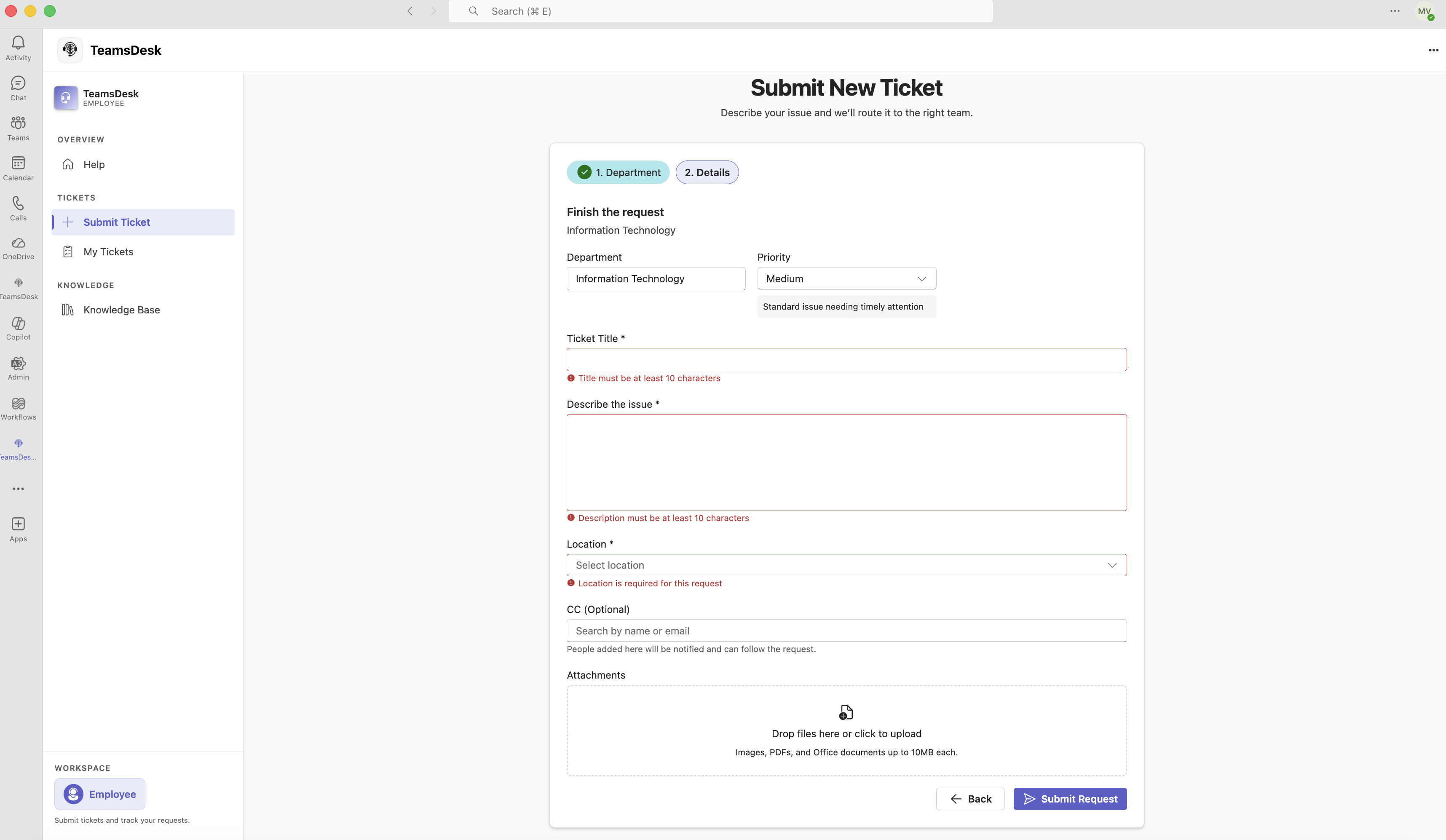
Submit a ticket without leaving Teams.

Employees open TeamsDesk as a tab inside Microsoft Teams, fill out a short form, and get immediate confirmation. No separate portal. No training required.

  • Department, priority, category, and file attachments on every ticket
  • Track status and add comments from the same Teams tab
  • Get notified when the ticket is updated or resolved
Employee ticket submission form in Teams

Built for every role in your org.

Employees, agents, department admins, and global admins each get a focused workspace — all inside Teams.

For employees

Submit tickets without leaving Teams.

Employees open TeamsDesk as a tab inside Microsoft Teams. No training, no separate login, no browser tab switching.

  • Department, priority, category, and attachments on every ticket
  • Track status and add comments from the same Teams tab
  • Instant confirmation — no chasing the inbox to know if it was received
Employee ticket history in TeamsDesk
Agent welcome overview in TeamsDesk
For agents

Your queue, your workload, inside Teams.

Agents see department queues, assigned tickets, SLA timers, and activity history — all from a focused workspace built for support work.

  • Department and personal queues with priority and SLA indicators
  • Ownership, routing, and internal notes on every ticket
  • Outlook email intake so email requests appear in the same queue
For department admins

Manage your department without IT.

Department admins configure their own categories, agent assignments, and SLA rules — no dependency on the global admin for day-to-day changes.

  • Add agents, set categories, and configure locations per department
  • SLA rules and escalation policies specific to your team
  • Department-level ticket reports and agent performance stats
Department admin settings in TeamsDesk
Global admin reports in TeamsDesk
For global admins

Full visibility across every department.

Global admins configure the entire organization — departments, Entra ID group mappings, SLA policies — and track performance across every team from one dashboard.

  • Cross-department reports: ticket volume, resolution time, agent stats
  • Entra ID group mappings and organization-wide SLA targets
  • Ticket exports to CSV, subscription management, and audit logs
Growth plan — adds AI

Add AI knowledge chat and ticket deflection.

Upgrade to Growth to get AI-powered knowledge chat in Teams, ticket deflection from approved articles, and auto-close when the employee confirms the fix worked.

AI knowledge base chat in Teams
Ticket deflection from approved KB articles
Auto-close after employee confirms fix
0+
Tickets in month one
VOA NCNN production deployment
0
Departments live on day one
IT, HR, and shared services
0%
Uptime since launch
Zero downtime on Azure infrastructure
“TeamsDesk saved us from paying per-agent fees and our team adopted it in a day because it's right inside Teams. We deployed across 4 departments and handled over 1,000 tickets in the first month alone.”
R
Rey Jimenez
IT Director, Volunteers of America (VOA) NCNN

Simple, flat pricing

No per-agent fees. Buy Basic or Growth and start today.

Why flat pricing? We price per organization, not per agent. A 250-person company might run 15–40 agents — flat pricing keeps that predictable and removes the penalty for giving more people access.
MonthlyAnnual Save 15%
Choose Basic if

You want a credible internal help desk inside Teams with admin controls, Microsoft 365 alignment, and unlimited agents.

Choose Growth if

You also want knowledge-powered self-service, AI chat in Teams, and AI help on repetitive ticket traffic.

Basic
30-day free trial
  • Teams-native ticketing for internal IT and support teams
  • Always unlimited agents and unlimited tickets
  • Departments, routing, and ownership
Company Sizei
Small
1–100 employees
$30/mo
Medium
101–500 employees
$60/mo
Large
501–1,000 employees
$100/mo
Enterprise
1,000+ employees
Contact us
Start 30-Day Free Trial

Credit card required · cancel before day 30 and pay nothing

Growth (AI)
14-day free trial
  • Everything in Basic
  • AI knowledge base chat in Teams
  • AI ticket deflection from approved KB articles
  • Auto-close after the requester confirms the AI-guided fix worked
Company Sizei
Small
1–100 employees
$60/mo
Medium
101–500 employees
$120/mo
Large
501–1,000 employees
$250/mo
Enterprise
1,000+ employees
Contact us
Start 14-Day Free Trial

Credit card required · cancel before day 14 and pay nothing

More capabilities coming

Endpoint automation, AI executive reporting, and deeper Microsoft integrations are on the roadmap. Contact us if you want early access or have specific requirements.

Need procurement support, custom rollout help, or 1,000+ employee pricing? Contact us.
Prefer to validate fit before buying? Book a demo.
Start Free Trial

Credit card required · cancel anytime during trial and pay nothing

Cost comparison

Lower cost without leaving the Microsoft workflow

TeamsDesk is designed for internal teams that want a help desk inside Teams, unlimited agents, and Microsoft-first operations without paying seat-based pricing.

Traditional help desks
Per-agent pricing
vs
TeamsDesk (unlimited)
Flat pricing

How TeamsDesk compares

Direct comparison with Jira Service Management and Freshservice.

FeatureJira Service MgmtFreshserviceTeamsDesk
Primary fitGeneral IT & dev workflowsGeneral-purpose ITSMMicrosoft-first internal support
Pricing modelPer agent / monthPer agent / monthFlat per organization
Agents includedSeat-basedSeat-basedUnlimited
Native Teams workspaceSeparate portalSeparate portalBuilt inside Microsoft Teams
Microsoft 365 alignmentAdd-ons requiredAdd-ons requiredTeams, Entra ID, Outlook — built-in
Entra ID / Azure ADVia integrationVia integrationNative — groups, roles, SSO
Knowledge & AI in TeamsSeparate from Teams workflowSeparate from Teams workflowGrounded knowledge chat in Teams (Growth)
Deployment complexityConfiguration-heavyModerate setup requiredFirst ticket in 1–2 days
Competitor details based on publicly available information as of 2025. TeamsDesk is optimized for Microsoft-first internal support — not a replacement for every use case.

Is TeamsDesk right for your team?

TeamsDesk fits IT and shared services teams already on Microsoft 365 who want a help desk inside Teams — without per-agent pricing or a separate portal to manage.

You're likely a good fit if:

Your company already lives in Microsoft Teams and Microsoft 365

You need an internal help desk for IT or shared services with fast employee adoption

You want unlimited agents without per-seat pricing pressure

You care about Outlook intake, Entra ID, Azure AD groups, and Teams-native adoption

Built for Microsoft-first organizations

The product is designed around Teams, Outlook, Entra ID, and Azure-hosted operations.

Adoption-friendly for internal teams

Employees, agents, department admins, and global admins each get a focused workspace inside Teams.

Transparent about what's live vs. coming soon

Live features, roadmap items, and private beta capabilities are clearly labeled — so you know exactly what you're buying today.

Less context switching

People request help, track status, and collaborate from the workflow they already use all day.

More operational control

Departments, categories, locations, ownership, activity history, and SLAs stay inside one system.

Frequently Asked Questions

Find quick answers to common questions about TeamsDesk.

Basic includes Teams-native ticketing, role-based workspaces, departments, categories, locations, ticket comments and attachments, reporting foundations, and unlimited agents and tickets.

See it in action

Start a free trial for Basic or Growth, or book a live demo if you want help evaluating the fit for internal IT, shared services, Microsoft 365 operations, or the Pro private beta.

support@queryminds.com
+1 (209) 304-7280
teamsdesk.queryminds.com
Contact us
We typically respond within one business day.
By contacting us you agree to our Privacy Policy.